
¿Cómo podemos ayudarle?
Llámenos: (847) 777-0000
Envíenos un correo electrónico: support@snapdiagnostics.com
Preguntas frecuentes de los pacientes
Acerca de la prueba
-
What information will I get from the sleep study?
By completing our sleep study and sharing it with your medical provider, you will learn:- whether or not you have sleep apnea,
- the type of sleep apnea,
- the severity of the condition, and
- which treatments are most appropriate.
-
For how many nights do I test?
Unless otherwise specified by your provider, we recommend testing for up to three (3) full nights of sleep. Breathing patterns can vary significantly from night to night, and collecting data over multiple nights provides a more accurate overall result. Snap’s lab technologists review the data from all nights tested and select the most representative night for a full analysis report. * If you typically use a PAP device, please see our FAQ on Testing with a PAP Device. -
How long do I have to be asleep?
On each night of testing, follow your normal bedtime routine and record your full night of sleep. We recommend allowing the recorder to collect a full 6 hours per night for up to 3 nights. Our recording devices have more than enough recording time available for additional testing as needed. At a minimum, try to get at least 3 straight hours of sleep for more accurate results. * If you typically use a PAP device, please see our FAQ on Testing with a PAP Device. -
Can I skip a night?
We recommend testing for up to 3 consecutive nights, but it is not required. You can skip a night as needed. -
Is the test safe for latex allergy?
Our testing device and sensors are safe for latex allergy. We don’t use latex in any of our products. -
What are your cleaning and disinfection practices?
Our cleaning and disinfection procedures are based on the Centers for Disease Control (CDC) guidelines for medical devices and health care facilities. Disinfection solutions meet the CDC guidelines to ensure the neutralization or removal of dangerous substances or germs from an area or object. We use fragrance free, allergy friendly products wherever possible. In response to the coronavirus (COVID-19) pandemic, we have implemented additional safeguards: All incoming and outgoing equipment is isolated for a quarantine period to ensure at least 6 days between patient uses. For more information, you can always contact us. -
Do background noises affect the test?
Typically, background noises don’t affect the test. The nasal cannula is designed to isolate your airflow and breathing. While the test might detect background sounds, our lab can easily distinguish and separate them out. One of the benefits of testing at home is that you can test under your usual sleeping conditions. However, if you have control over the noise level in a way that doesn’t affect your usual sleep, then reducing the noise level can only help. -
Where can I access the results?
Your test results will be sent directly to your medical provider to review at your next appointment. If you would like to receive a copy of your results from Snap, please complete the Patient Information Request Form. You may submit this form to Snap via secure upload here. The completed form can also be returned to Snap by mail, fax or email. Please be aware that email is not considered the most secure method of information transfer.
Durante su prueba
-
In which position should I sleep while testing?
You should sleep in the positions you normally sleep in and are most comfortable for you. The goal is to get a good picture of your natural sleep patterns. Our test is designed to accommodate most sleeping positions. If you find that an adjustment is needed to feel comfortable, please call us for assistance.
Note: To ensure a representative sample which includes all of your natural sleeping positions, we recommend recording for 3 nights.
-
Should I take my regular medication prior to testing?
The general rule is to perform the test under your usual routine and sleeping conditions. Therefore, in most situations you should continue taking your usual medications during testing. We recommend that you contact your physician if you have any questions. -
Can I have an alcoholic drink before taking the test?
The test is most accurate when it represents your normal sleeping pattern and environment. If you usually have a drink, then you can follow your same routine, unless your doctor has indicated differently. If you have any questions, you should contact your physician. -
Can I test while wearing my PAP device?
Your medical provider may ask you to test with or without your treatment device, or, commonly, to test under both conditions (1-2 nights with and 1-2 nights without). Typically, you should test with your PAP device to determine if it is effective. You should test without the device to measure your baseline level of apnea, establish your estimated optimal airway pressure setting, and/or to determine whether you are a candidate for other treatments. If you are unsure of what to do, confirm with your provider. When testing with a PAP device, the nasal cannula can be worn underneath most nasal masks without modification. If you have a nasal pillow or a full-face mask, you may need to modify the cannula slightly to fit. If you have any concern about testing without your PAP device, please speak with your provider. For additional instruction, call us or email support@snapdiagnostics.com. -
Can I test while wearing an oral appliance or dental device?
Your medical provider may ask you to test with or without your treatment device, or, commonly, to test under both conditions (1-2 nights with and 1-2 nights without). Typically, you should test with your oral appliance or dental device to determine if it is effective. You should test without the device to measure your baseline level of apnea and/or to determine whether you are a candidate for other treatments. If you are unsure of what to do, confirm with your provider. -
Can I sleep with my pet while using the testing equipment?
We understand the comfort of sleeping with your pet. While you may sleep with your pet while testing, we strongly recommend keeping them separated from the testing equipment. Pets, especially curious ones, can accidentally damage the delicate wires, sensors, or other parts of the kit. If equipment parts are damaged by a pet, you will be liable for the replacement cost. -
Can I test during the day?
The sleep test should be performed when you would normally sleep. In order for your physician to make an accurate diagnosis, the test should be performed under your usual sleeping conditions. If you have a variable sleep schedule, you can note the different conditions for each day of testing.
Seguro y pago
-
Will my insurance cover the test?
Most insurance companies cover home sleep testing. The level of reimbursement depends on your individual insurance policy, co-insurance, and deductible. Contact us to learn about your specific plan benefits and options. Note that insurance companies require information about your health to determine medical necessity for the test. If your record is incomplete, your insurance may dispute the claim or deny coverage. Please complete all information requested during registration. -
Does insurance cover multiple night testing?
Most insurance plans will only accept one night of testing. Nevertheless, Snap recommends collecting multiple nights of data to ensure the highest quality test result. Our lab technologists will review the data from all nights collected and select the most representative night for a full analysis report. Multiple night data collection resolves inaccuracies associated with single night testing, such as "first night effect" and night-to-night variability, while avoiding increased costs to insurance. -
How much can I expect to pay out-of-pocket?
Patients covered by insurance will typically have a small out-of-pocket cost. When you register, we provide a cost estimate based on your insurance. Payment will be charged to your card on file after testing has been completed and processed by your insurance. For additional information, please see our Financial Policy. -
Do you offer a payment plan?
We can work with you to come up with a personalized payment plan. Please contact our customer support for assistance.
Registro
-
How do you secure my information?
The online patient registration process communicates your information to Snap Diagnostics using industry-standard HTTPS encryption, specifically the latest Transport Layer Security (TLS) protocol. Your information is handled subject to our privacy policy as well as industry and regulatory standards, including Payment Card Industry (PCI) compliance for processing and securing your payment card information, and HIPAA compliance for processing and securing your protected health information.
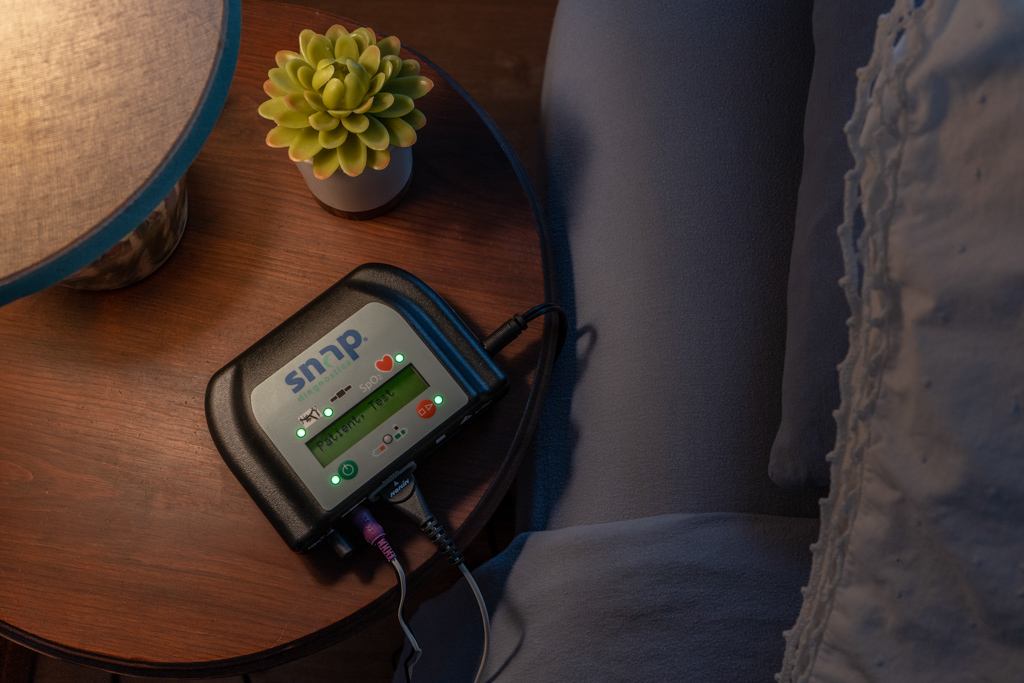
Snap® Model 8
-
What do I do if I need to use the bathroom during the test?
If you need to get up during the test for any reason, allow the device to continue recording while you are away. Remove all 3 sensors from your body, leaving them connected to the recorder. When you return, reapply the sensors and go back to sleep. -
Does the recorder need to be plugged into a power outlet?
A power supply cable is provided in your test kit to recharge the device battery. While we recommend keeping it connected during the test, it is not required. Instead, you may plug the device into an outlet for a few hours before testing to ensure good battery life. -
Can I turn off the device when it is not in use?
Yes, after you have completed testing for the night, you may turn off the device. Your recorded data will remain stored. To turn off the device, press the green power button (the same button that you use to turn it on).
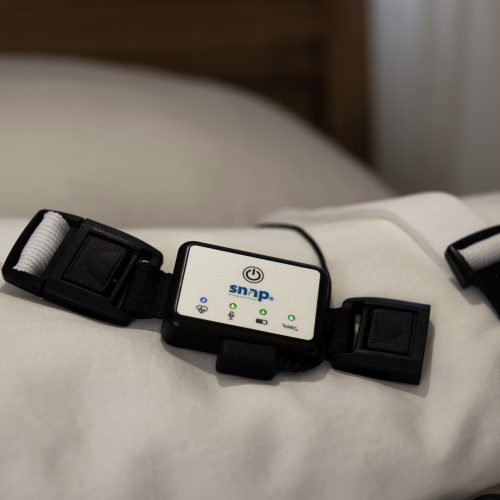
Snap® Model 9
-
What do I do if I need to use the bathroom during the test?
If you need to get up during the test for any reason, you can leave the monitors on. If you need to remove any sensors, reapply them when you return to bed. If you remove the Oximetry Watch Monitor you may have to turn it back on after reapplying it. -
How can I check whether the device is recording?
The “REC” light indicates recording status. Once recording has started, the “REC” light will turn green and blink every 5 seconds throughout the night. The sensor lights will turn off for a dark and comfortable sleep environment. The recording will stop on its own after 6 hours of data collection. -
How can I check whether the sensors are properly connected during the recording?
Once recording has started, the “REC” light will blink every 5 seconds. The sensor lights on the Sleep Apnea Monitor (SAM) will turn off for a dark and comfortable sleep environment. Be aware that pressing the power button twice quickly will turn the monitor off. If you are ever unsure whether the monitor is on, you can press the power button one time and the lights will briefly illuminate to confirm that it is on. The heart-shaped light (Oximetry) should appear solid blue and the remaining lights should appear solid green. After displaying the status for several seconds, the sensor lights will turn off again. -
What does the message "Error 4" mean on the Oximetry Watch Monitor?
If the ring sensor is not properly connected, the watch monitor will alert you with an Error 4 message. To resolve this, check the cable connection where the sensor plugs into the watch, ensuring it is completely and cleanly inserted. -
Why does the Oximetry Watch Monitor + Ring Sensor remain on after the SAM has finished recording?
The Oximetry Watch Monitor will remain on and the ring sensor light will remain red until the sensor is removed from your finger or thumb. Once the sensor is removed, the monitor will turn off automatically. -
If I remove the Oximetry Watch Monitor + Ring Sensor during the night, can I reconnect it?
Yes. If you remove the Oximetry Watch Monitor + Ring Sensor during the night, then it will turn off automatically. To reconnect, simply strap on the watch, put the sensor in place on your finger, and turn it back on. It will automatically pair with the Sleep Apnea Monitor (SAM). -
How do I turn off the monitors in the morning?
How do I turn off the monitors in the morning?
You generally do not need to turn off the monitors manually, as they are designed to shut down on their own. However, if a monitor is still running, here's what to do: Sleep Apnea Monitor (SAM): If the SAM is still powered on when you wake up, press the power button two times quickly (a rapid double-tap) to turn it off. Oximetry Watch Monitor: First, remove the watch and ring sensor. The monitor should turn off automatically within one minute. If it stays on, press the power button once on the side of the watch.